 MustDo · Blog
Missing notifications is not a character flaw
A reminder notification sounds once. The banner is gone in seconds. On Silent mode there is no sound at all, and during a Focus only the apps you allowed get through. "Missing" a notification is not a lapse in attention: notifications are designed for information you can afford to miss.
Alarms in the Clock app follow different rules. They ring on Silent mode, they keep ringing until you stop them, and they take over the screen with Stop and Snooze. Making a reminder that "rings until it's done" means moving your to-do over to the alarm side of that line.
Option 1: Make an alarm by hand in the Clock app (free)
The most reliable and the most tedious option. Create an alarm at the time of the task and put the task in the label. It is a real alarm, so it rings. The downsides: one alarm per task, snooze is fixed at nine minutes, and there is no "push it to tomorrow". Fine for two or three tasks, unworkable when new ones arrive every day.
Option 2: Make Reminders notifications more insistent (free, partial)
Under Settings > Notifications > Reminders, turn on Time Sensitive notifications so they show during a Focus. This does nothing about the Ring/Silent switch, and the notification still sounds once. It is still something you can miss.
Option 3: Turn the to-do into a real alarm with an AlarmKit app (iOS 26 or later)
With iOS 26 Apple added AlarmKit, which lets apps other than Clock create alarms that break through Silent mode and Focus. Our app MustDo: To-Do Alarm is a to-do app built on it. Here is the setup in MustDo.
- Install the app and allow alarms. On first launch iOS asks once whether to allow alarms. Without that permission nothing rings, so tap Allow. If you declined, the app keeps showing the notice with an Open the Settings app button until alarms are allowed; the Settings tab > Permissions row shows whether they are.
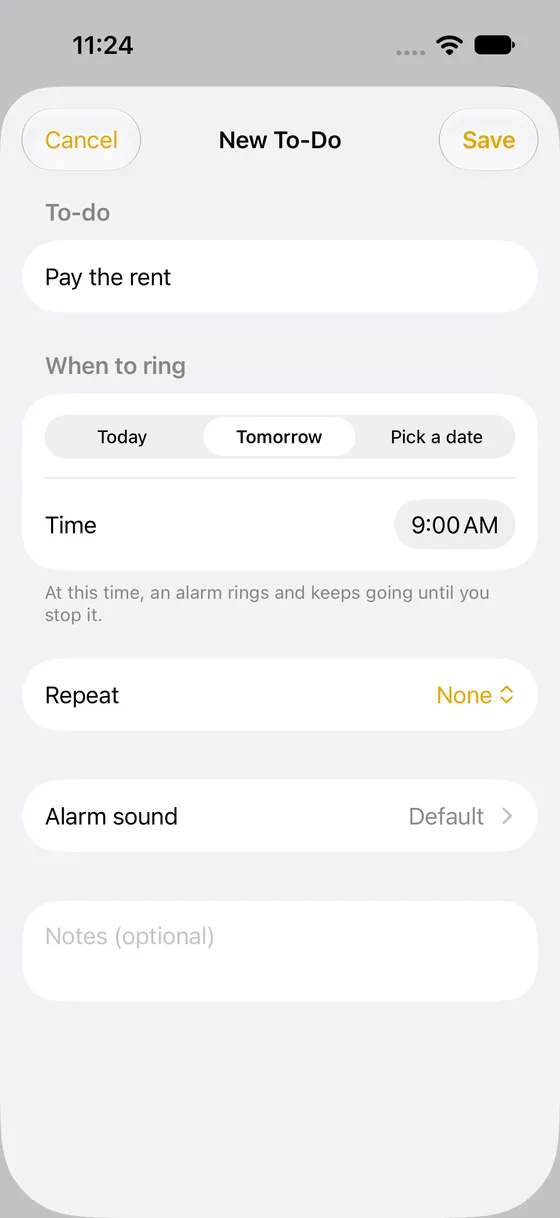
- Type the to-do in one line. Tap "+", type "Call the dentist" and save. That is already an alarm for tomorrow at 9:00 AM. Need it today? Tap Today and pick a time.
- Add a repeat for recurring tasks. Daily medicine, Tuesday bins: use Repeat. Daily, weekly, monthly and yearly are there, and so are "every 2 weeks", "the first Tuesday of the month" and "end after 10 times".
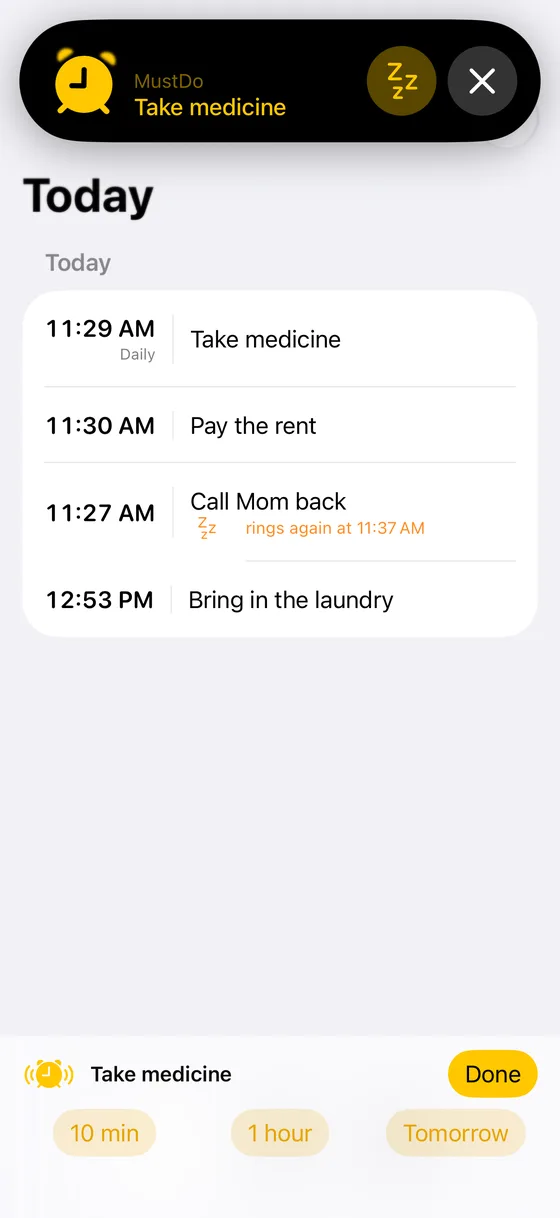
- When it rings, stop it or snooze it. At the set time a full-screen alarm rings. Done? Tap Done and it stops. Not yet? "10 min", "1 hour" or "Tomorrow". It rings again as many times as it takes.
- Act from the Lock Screen. While it rings, a Live Activity appears on the Lock Screen, so you can mark it done or snooze without unlocking the phone.
Habits that make "rings until done" work
- Pick a time when you can actually do it. "Medicine at 9 PM" works because your hands are free at 9 PM. An alarm that always lands in a meeting trains you to snooze.
- Stop means done. Keep that promise. In MustDo, stopping the alarm marks the to-do as done. If you have not done it, choose a snooze instead of "just making it quiet". This one habit removes most of the misses.
- Decide what "Tomorrow" means. In Settings you can make "Tomorrow" ring at the same time or at a fixed morning time. Pushing an evening task to Tomorrow then rings the next morning.
- Match the sound to the task. There are 25 sounds. A gentle one for medicine, an urgent one for deadlines, and you know what it is before you look.
Why a louder notification does not fix it
It is tempting to look for an app that promises "loud" or "persistent" notifications. On iPhone those apps are still sending notifications, and notifications obey the Ring/Silent switch and the Focus rules no matter how they are styled. The only thing that bypasses those rules is an alarm, and before iOS 26 only the Clock app could create one. That is why the honest answer to "which reminder app rings on Silent mode" used to be "none of them, use the Clock app", and why the answer changed with AlarmKit.
There is a second reason louder is not better. A notification, however loud, sounds once and then waits for you to notice it. An alarm reverses the burden: it keeps going until you respond. For things you must not miss, that reversal is the whole point. You are allowed to forget about the task until it rings, because forgetting no longer costs you anything.
Which option fits you
| Your situation | Best fit |
|---|---|
| Two or three fixed-time tasks, rarely changing | Clock app alarms, labelled with the task |
| You mainly miss things during a Focus, phone is never on Silent | Reminders with Time Sensitive notifications |
| New tasks every day, phone often on Silent, you want "snooze until done" | An AlarmKit to-do app on iOS 26 |
| You still run iOS 18 or earlier | Clock app alarms until you can update |
Three mistakes that bring the misses back
- Denying the alarm permission. If you tapped "Don't Allow" on first launch, nothing rings, and the app cannot fix that for you. The app shows a notice with an Open the Settings app button; allow alarms there and it rings again.
- Stopping the alarm "for now". Stop is a promise that the task is done. If you stop it to make the room quiet and plan to come back later, the whole system collapses. Snooze instead; that is what the three buttons are for.
- Putting everything on the alarm. An alarm is for the things that cannot slide. If every small note becomes an alarm, you will start stopping them without reading, and the important ones go with them. Keep the list short and the stakes real.
In short
People who miss notifications do not need louder notifications. They need an alarm that rings until it is stopped. With a handful of tasks, the Clock app is enough. When new tasks arrive daily, hand them to a to-do app built on AlarmKit. See also our setup examples for medicine, bills and trash day.
Related
Medicine, bills, trash day: set the to-dos you cannot forget just once
Daily medicine, a monthly bill, weekly trash day. Concrete examples of setting each up once on iPhone and letting an alarm that rings until you stop it do the remembering: choosing repeats, what "Tomorrow" does to a repeating to-do, picking the right time.
Read more →How to get an iPhone reminder that rings on Silent mode (and what AlarmKit is)
Why iPhone reminders stay quiet on Silent mode and in Focus, and how AlarmKit in iOS 26 lets apps ring like a Clock app alarm. Notifications and alarms compared in one table.
Read more →Ask Claude to remember it: putting a to-do into an iPhone alarm with MCP
Tell Claude or another AI assistant "call the dentist tomorrow at 9:30" and a real alarm rings on your iPhone. How to connect MustDo through MCP, as a custom connector in claude.ai or a local server on your Mac, with example conversations.
Read more →