 MustDo · Blog
Remembering should not be a job
The to-dos you cannot afford to forget are the ones that wear you out, because you try to remember them every single time. Medicine is daily, rent is monthly, trash day is weekly. For anything with a cycle, set it once and let an alarm do the remembering. Below are six concrete setups in MustDo: To-Do Alarm. All of them run on the same rule: when it rings, do it and stop it; if not, snooze.
Six setups
| To-do | How to write it | Time | Repeat |
|---|---|---|---|
| Medicine | "Take the medicine" | 9:00 PM | Daily |
| Bills and transfers | "Transfer the rent" | 25th, 10:00 AM | Monthly on the 25th |
| Trash day | "Put the bins out" | 7:30 AM | Weekly on Tue and Fri |
| Laundry | "Bring in the laundry" | 5:30 PM | None (just today) |
| Calling back | "Call Sam back" | 3:00 PM | None |
| Deadlines | "Submit the expense report" | Friday 4:00 PM | Weekly on Fri |
Steps: setting it up once in MustDo
- Write the to-do as a short verb phrase. "Take the medicine", not "medicine". When it rings, the screen tells you exactly what to do.
- Choose a time when your hands are free. Medicine after dinner at 9 PM; the transfer at 10 AM when you can open the banking app. A time that always lands in a meeting only teaches you to snooze.
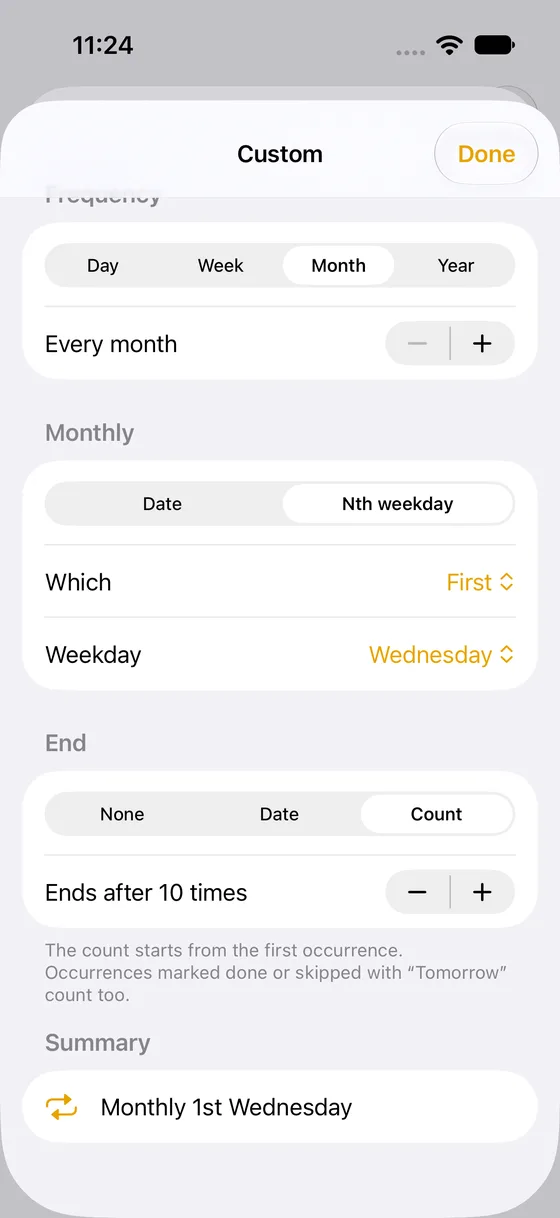
- Add a repeat for anything with a cycle. Daily, weekly, monthly and yearly, plus "monthly on the 25th", "weekly on Tue and Fri", "every 2 weeks" and "the first Tuesday of the month". An end date or a count is available too.
- Give each kind of to-do its own sound. There are 25 sounds. Gentle for medicine, urgent for deadlines, and you know what it is the moment it rings.
- When it rings: do it and stop it. Not yet? "10 min", "1 hour" or "Tomorrow". Stopping marks it as done. Snooze before taking the medicine and it rings again in 10 minutes.
What "Tomorrow" does to a repeating to-do
One rule to remember. Snoozing a repeating to-do to "Tomorrow" skips today's occurrence only. Tomorrow's occurrence was already going to ring tomorrow. So on a week with no trash, tapping "Tomorrow" never gives you two alarms the next day.
For a one-off to-do, "Tomorrow" rings either at the same time or at a fixed morning time, depending on your settings. Pushing a 10 PM "call back" to Tomorrow so that it rings at 9 AM is a handy way to use it.
Tips per to-do
- Medicine: keep morning and evening as separate to-dos ("Morning medicine", "Evening medicine"); one combined to-do makes you wonder which one you took. If you realise you missed a dose, follow your doctor's or pharmacist's instructions. The app is a reminder, not medical guidance.
- Bills: add a separate "check the balance" two or three days before the due date, so "it rang but I could not pay" stops happening.
- Trash day: split it into "bag up the trash" the night before and "put the bins out" in the morning; mornings get shorter.
- Calling back: put the other person's good hours in the to-do's note. The note shows when it rings.
- Deadlines: ring on the day you start, not the day it is due. For a Friday 5 PM deadline, "start the expense report" on Thursday at 4 PM.
When the cycle breaks: holidays, travel, a changed schedule
Repeats are only useful if they survive real life. A few patterns handle the exceptions without rebuilding anything.
- A week off (holiday, no collection): when the alarm rings, tap "Tomorrow". For a repeating to-do that skips today's occurrence only, and the next week rings as usual.
- Travelling across time zones: the to-do keeps its wall-clock time where it was created. "Medicine at 9 PM" in Tokyo is still 9 PM Tokyo time while you are in London, which is usually what a dose schedule needs. If you want it on local time instead, edit the time for the trip and change it back when you return.
- The schedule changed for good: edit the repeat on the to-do itself rather than adding a second one. Two overlapping repeats are the most common cause of "it rang twice".
- A task that ends: a course of medicine for ten days, a payment plan with six instalments. Set "end after 10 times" or an end date, and the to-do retires itself instead of nagging you for something that is over.
A two-minute weekly review
Once a week, open the Upcoming tab and read the list top to bottom. You are looking for three things: to-dos whose time no longer fits your week, repeats that have ended but are still there, and anything you keep snoozing. The last group is the interesting one. A to-do you have snoozed five times is either at the wrong time, or it is not really a to-do but a decision you have been avoiding. Move the time, or delete it and write down the actual decision. The list should stay short enough that every alarm still means something.
Set it once, then trust it
Once the setup is done, let go of remembering. Being allowed to forget until it rings is the real benefit of an alarm that rings until it is done. For how it rings on Silent mode and in Focus (AlarmKit), read this article; to add to-dos from an AI assistant, see Ask Claude to remember it.
Related
How to make a reminder that rings until it's done (for people who miss notifications)
For people who keep missing notifications: a step-by-step guide to building a reminder on iPhone that keeps ringing until you stop it and snoozes until the task is done, from free options to AlarmKit apps on iOS 26.
Read more →How to get an iPhone reminder that rings on Silent mode (and what AlarmKit is)
Why iPhone reminders stay quiet on Silent mode and in Focus, and how AlarmKit in iOS 26 lets apps ring like a Clock app alarm. Notifications and alarms compared in one table.
Read more →Ask Claude to remember it: putting a to-do into an iPhone alarm with MCP
Tell Claude or another AI assistant "call the dentist tomorrow at 9:30" and a real alarm rings on your iPhone. How to connect MustDo through MCP, as a custom connector in claude.ai or a local server on your Mac, with example conversations.
Read more →