MustDo: To-Do Alarm — Reminders that ring until doneDon't let your to-dos
end as a notification.
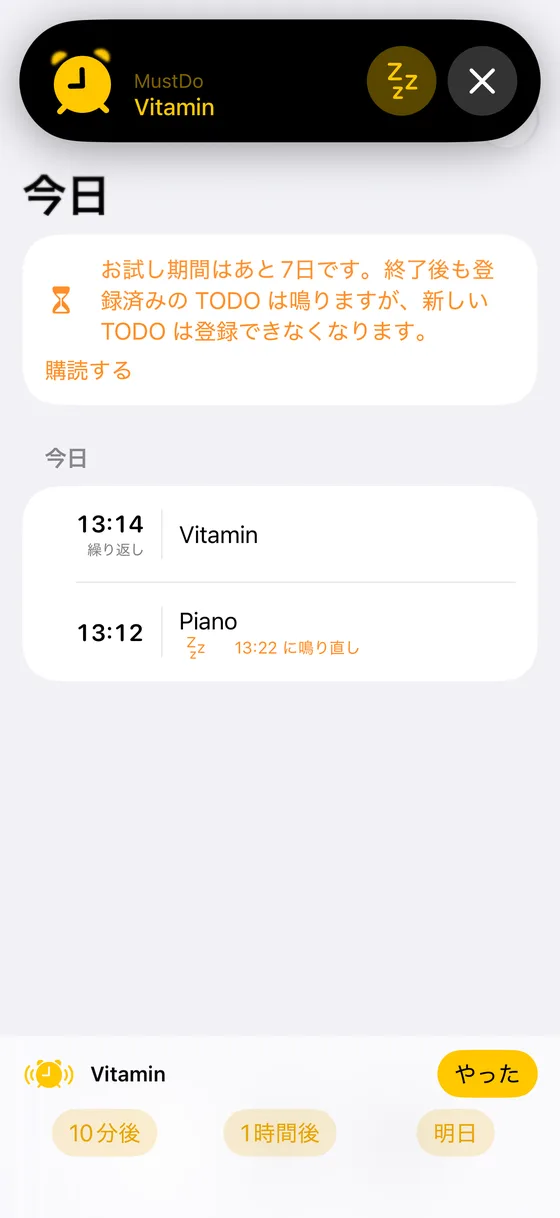
Add a to-do and a time. At that time, a real alarm rings, just like the Clock app. It rings on Silent mode and in Focus, and keeps ringing until you stop it. Stopping it means you did it. Not yet? Snooze until you do.

A notification you can swipe away is not a reminder
- Silent on Silent mode
- Sounds once, then the banner disappears
- Swipe it away and it is gone
 A MustDo alarm
- Rings on Silent mode and in Focus
- Keeps ringing until you stop it
- Stop means done. Not yet? Snooze until you do it
All you add is a to-do and a time.
MustDo rings at that time. Repeats and snoozes come back on their own.
Add a to-do and a time
"Take the medicine, 9:00 PM." Repeat daily or on the weekdays you choose: the medicine at 9 PM, the bins on Tuesday, the report every Friday.
It rings. And keeps ringing
Built on AlarmKit in iOS 26, so it rings like a Clock app alarm: full screen, through Silent mode and Focus, until you stop it.
Stop it when done. Not yet? Snooze
Stopping the alarm marks the to-do as done (tapped by mistake? swipe to undo). Not yet? "10 min", "1 hour" or "Tomorrow". It rings again, as many times as it takes.

Made to not be ignored
Snooze until it is done
"10 min", "1 hour" and "Tomorrow" are right on the alarm screen and in the Live Activity. Tomorrow rings at the same time, or at a fixed morning time if you set one.
Repeats
Daily, or weekly on the days you pick. Snoozing a repeating to-do to "Tomorrow" skips today's occurrence only.
Act from the Lock Screen
While it rings, a Live Activity appears on the Lock Screen. Mark it done or snooze without unlocking your iPhone.
25 alarm sounds
From gentle to urgent, or vibrate only. Light, dark, or match your device.
Add to-dos from AI (MCP)
A small MCP server for your Mac lets Claude and other AI clients read and add your to-dos, straight into your iCloud. Tell your assistant what needs doing; MustDo rings until it is done.
How to set up MCP →Optional Face ID lock
Lock the app behind Face ID or your passcode. Alarms still ring and can be stopped while the app is locked.
Pricing
Every feature, no limits. You will never be charged automatically when the trial ends.
To-dos you have already added keep ringing without a subscription, and you can still stop, snooze and delete them. An app like this should never go quiet because of billing.
Privacy
Your to-dos are personal. MustDo has no servers of its own.
- ✓Stored in your own iCloud and synced across your devices by Apple
- ✓No account, no sign-in
- ✓We never see your to-dos
FAQ
Does it really ring on Silent mode?
Yes. MustDo uses AlarmKit in iOS 26 to create alarms that are treated like Clock app alarms. They ring with the Silent switch on and during Focus, and keep ringing until you stop them. You grant the alarm permission once, when you first open the app.
Where are my to-dos stored?
In your own iCloud account, in the app's private CloudKit database. Apple encrypts them in storage and in transit and syncs them across your devices. We run no server and cannot read them.
What happens after the free trial?
All features are free for 30 days. After that, a subscription (monthly or yearly) is needed to add new to-dos. The ones you already added keep ringing, and you can still stop, snooze and delete them.
Which iPhones are supported?
iPhone with iOS 26 or later, because AlarmKit was introduced in iOS 26.
Never let a to-do slide again.
Add a to-do and a time.
Coming soon on the App Store.
Free for 30 days · then a subscription (monthly or yearly) · iOS 26 or later