 MustDo · Blog
What's new
Until now, you could add a To-Do to MustDo (the alarm that rings until it's done) with the + button in the app, or from an AI assistant such as Claude through MCP. Starting with 1.0.8, you can also add one with Siri and the Shortcuts app.
A To-Do added this way is treated exactly like one added in the app. At its time it rings as an iOS 26 AlarmKit alarm and keeps ringing until you tap Done or choose a snooze.
What to say to Siri
- Say "Add a to-do in MustDo". "Add a to-do to MustDo" and "Add to MustDo" work too. The phrase needs to include the app name, MustDo.
- When Siri asks "What do you need to do?", answer. For example, "Buy milk".
- Check the reply. Siri reads back when it will ring, along the lines of "“Buy milk” will ring at Sun, Nov 15, 9:00 AM." The app does not open.
To check what's left today, say "Today's to-dos in MustDo" or "Show today's to-dos in MustDo".
If your iPhone is locked, you are asked to unlock it first, so no one else can add an alarm to a locked phone.
No time? It rings at tomorrow's default time
The Siri phrase does not ask for a time. The To-Do rings at tomorrow's default time (9:00 AM unless you change it), the same as a quick add in the app. You can change the default time in the app's settings.
If you have set Quiet Hours and that time falls inside them, the alarm moves to the end of Quiet Hours, and Siri tells you so.
Run it from the Shortcuts app or Back Tap
MustDo's "Add To-Do" shows up automatically in the Apps area of the Shortcuts app. No setup is needed (Apple Support: Run app shortcuts on iPhone or iPad).
If you build your own shortcut with MustDo's "Add To-Do" action, you can fill in the To-Do and the Time in advance, so a task you add often takes one tap. If the time you set has already passed, it rings at the next occurrence of that time (tomorrow, if today's has passed).
You can also run that shortcut by tapping the back of your iPhone two or three times: go to Settings > Accessibility > Touch > Back Tap, choose Double Tap or Triple Tap, and pick it from the Shortcuts section (Apple Support: Run shortcuts by tapping the back of your iPhone). Saying the shortcut's name to Siri runs it as well (Apple Support: Use Siri to run shortcuts with your voice).
What happens when it rings
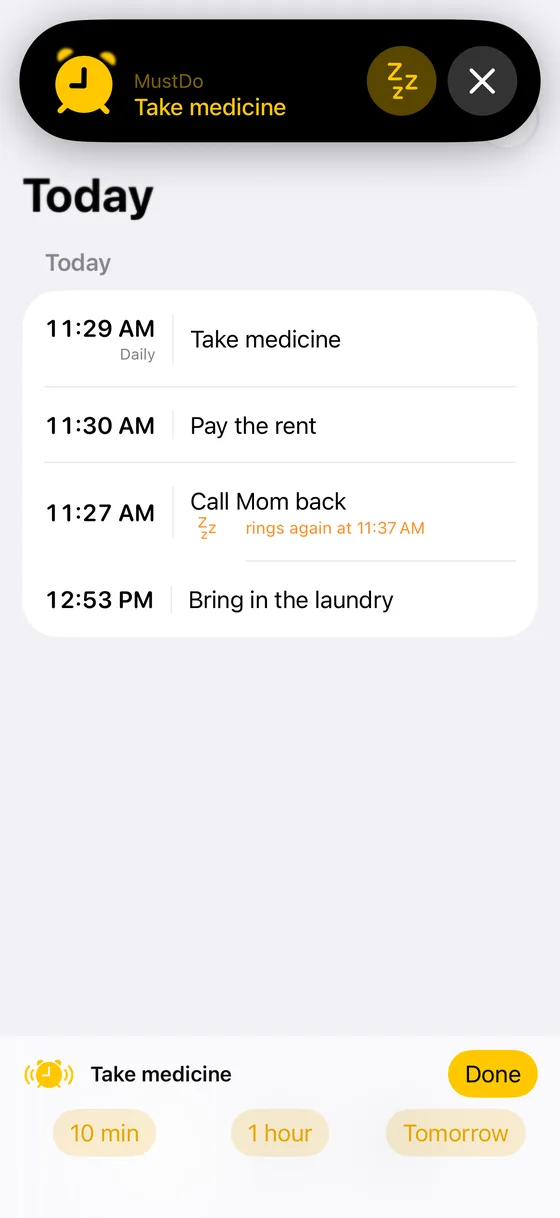
At the set time a full-screen alarm rings, even on Silent mode. If you did it, tap Done. If not, choose 10 min, 1 hour or Tomorrow. It rings again until it's done.
If the alarm can't be set right away, for example because alarms aren't allowed yet, Siri won't say it will ring. It says the To-Do was added but the alarm couldn't be set, so open MustDo to check.
FAQ
Can I say it in one go, like "Add buy milk to MustDo"?
Not at the moment. Say "Add a to-do in MustDo", and answer when Siri asks what you need to do.
How do I add one at a specific time?
The Siri phrase uses the default time. To choose a time, set the Time in the "Add To-Do" action in the Shortcuts app, or change the time in the app afterwards.
What happens after the free trial?
MustDo is free for 30 days, then a subscription (monthly or yearly). Without a subscription you can't add new To-Dos from Siri either, and Siri tells you so. To-Dos you already added still ring after a subscription ends.
Summary
When something comes to mind, say "Add a to-do in MustDo". If you don't give a time, it rings tomorrow morning until you stop it. For more on alarms that ring until it's done, see how to make a reminder that keeps ringing.
Note: For medication, medical care or anything else where a missed alarm could have serious consequences, do not rely on this app alone. Use it alongside another method. Alarm behavior depends on iOS and your device settings.
For events that are already in your calendar, there is our sister app KeyAlarm, which turns them into alarms by keyword.
Related
KeyAlarm or MustDo: which one do you need?
Both are iPhone apps built on iOS 26's AlarmKit that keep ringing through Silent mode and Focus until you stop them. The difference is what they ring for: calendar events (KeyAlarm) or To-Dos (MustDo).
Read more →iPhone Reminders not going off, or easy to miss? Three options
Reminders not alerting you, or getting ignored? What to check in Settings, how the Urgent option helps, and when an alarm-based to-do app fits.
Read more →How to ring your iPhone at medicine time: notifications, Urgent, or an alarm-based to-do app
Taking medicine at set times? How iPhone notifications, the Reminders Urgent option, and an alarm-based to-do app differ, and how to set each one up.
Read more →