 MustDo · Blog
It stays quiet because it is a notification
Flip the Ring/Silent switch on the side of your iPhone (or the Action button on newer models) and notifications stop making sound. Reminders, Calendar, and nearly every to-do app deliver their alerts as notifications. So they pass quietly.
Yet on the same phone, an alarm from the Clock app rings. Silent switch on, Focus on, it does not matter: it rings until you stop it. Inside iOS, notifications and alarms are different systems with different rules.
| Notification (Reminders, to-do apps) | Alarm (Clock app) | |
|---|---|---|
| Silent switch on | No sound | Rings |
| During a Focus | Only allowed apps show | Rings |
| How long | Once, a few seconds | Until you stop it |
| On screen | A banner you can swipe away | Full screen with Stop and Snooze |
| Who can create one | Any app | Only the Clock app, until iOS 25 |
The last row is the important one. Through iOS 25, no third-party app could create an alarm, no matter how clever it was. Apps advertising "loud reminders" were sending loud notifications, and the Silent switch always won.
AlarmKit: the door Apple opened in iOS 26
In iOS 26 Apple added a framework called AlarmKit. With it, apps other than Clock can create alarms that the system treats like Clock app alarms. In its WWDC25 session Apple describes the alert as one that "breaks through the silent mode and the current focus".
AlarmKit alarms have these properties:
- Available on iOS 26 and iPadOS 26 or later. Older versions cannot use it, so updating to iOS 26 comes first.
- The user has to allow it. The first time an app schedules an alarm, iOS asks once whether to allow alarms for that app. You can change the answer later under Settings for that app.
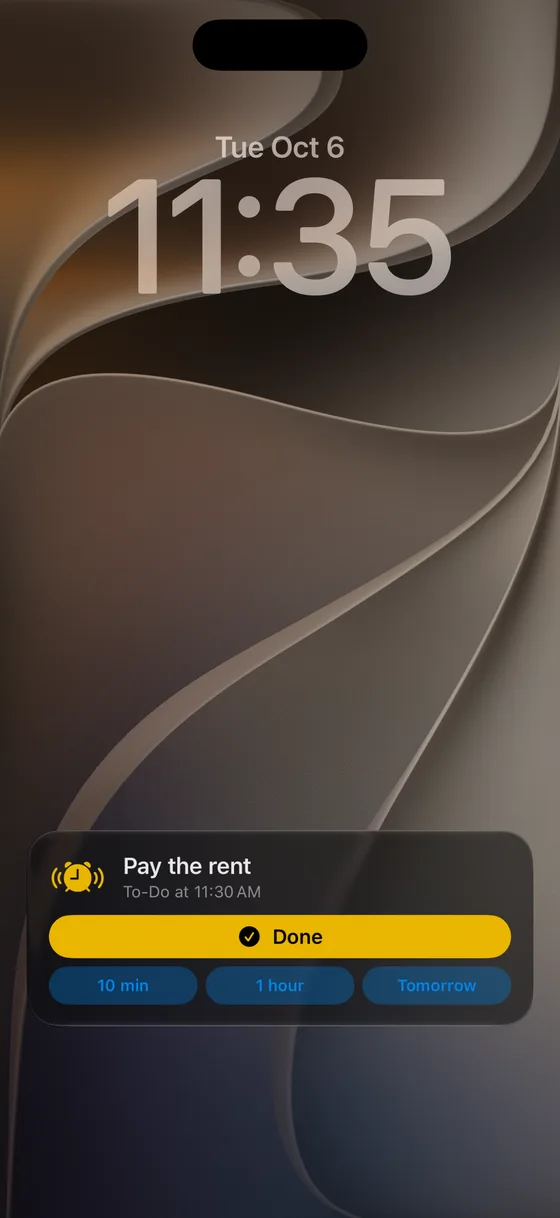
- A full-screen alert, plus the Lock Screen and Dynamic Island. When it fires you get the same full-screen treatment as the Clock app: a Stop button and either a Snooze button or a second button the app defines.
- Scheduled alarms and countdowns. Both fixed-time alarms (including repeats) and timer-style countdowns.
What to look for in an AlarmKit app
AlarmKit solves "does it ring". The differences show up after it rings.
- What happens when you stop it. Is stopping recorded as "done", or does the alarm simply end?
- Snooze options. The Clock app snoozes for a fixed nine minutes. A to-do needs intervals that fit the task: 10 minutes, 1 hour, tomorrow.
- How flexible repeats are. Daily and weekly only, or "the first Tuesday of the month" and "every 2 weeks" like the Calendar app?
- Where the data goes. To-dos are personal. Are they sent to the developer's server or kept in your own iCloud? The App Privacy section on the App Store tells you.
What AlarmKit does not change
A few things stay the same, and knowing them avoids surprises.
- It is still a sound. AlarmKit makes the alarm sound through the same mechanism as a Clock app alarm, with a default or app-provided sound; Apple's documentation does not describe a separate volume rule for it. If an alarm seemed too quiet, check the iPhone's volume before blaming the app.
- Permission is per app, and you can revoke it. If an alarm app stops ringing after an iOS update or a restore, the first thing to check is the permission for that app in the Settings app (Apple says people can change it there at any time), and whatever the app itself shows about it.
- The to-do still has to be entered. AlarmKit makes the alarm ring; it does not read your mind, your email or your calendar. Some apps read a calendar for you (our KeyAlarm does that for calendar events), others wait for you to type a to-do or let an AI assistant add one. Decide which you want before choosing.
- It is iOS 26 only. On an iPhone that cannot run iOS 26, the Clock app remains the only source of real alarms.
Before you say "the alarm app doesn't work"
When a reminder that should have rung did not, walk through this list in order. It resolves nearly every report we receive.
- Is the iPhone on iOS 26 or later? (Settings > General > About)
- Are alarms allowed for the app? (In MustDo: Settings tab > Permissions > Alarms says Allowed)
- Is the iPhone's volume turned up?
- Was the to-do actually scheduled, with a time in the future? Look at the app's upcoming list.
- Did someone stop it from the Lock Screen or an Apple Watch before you saw it? A stopped alarm is a stopped alarm.
Note what is not on the list: Silent mode and Focus. With AlarmKit those are no longer reasons.
How MustDo answers those four questions
Our app MustDo: To-Do Alarm answers them like this: stopping marks the to-do as done; if it is not done, snooze for 10 minutes, 1 hour or until tomorrow and it rings again; repeats are as flexible as the iOS Calendar; and to-dos are stored only in your own iCloud, with no developer server and no sign-in. It requires iOS 26 and is free for 30 days.
In short
Reminders stay quiet on Silent mode because they are notifications. If you want it to ring, it has to be an alarm, and since iOS 26 apps other than Clock can make one. Our guide on building a reminder that rings until it's done walks through the options, starting with the free ones.
Related
How to make a reminder that rings until it's done (for people who miss notifications)
For people who keep missing notifications: a step-by-step guide to building a reminder on iPhone that keeps ringing until you stop it and snoozes until the task is done, from free options to AlarmKit apps on iOS 26.
Read more →Medicine, bills, trash day: set the to-dos you cannot forget just once
Daily medicine, a monthly bill, weekly trash day. Concrete examples of setting each up once on iPhone and letting an alarm that rings until you stop it do the remembering: choosing repeats, what "Tomorrow" does to a repeating to-do, picking the right time.
Read more →Ask Claude to remember it: putting a to-do into an iPhone alarm with MCP
Tell Claude or another AI assistant "call the dentist tomorrow at 9:30" and a real alarm rings on your iPhone. How to connect MustDo through MCP, as a custom connector in claude.ai or a local server on your Mac, with example conversations.
Read more →