 KeyAlarm · Chart
01The chart
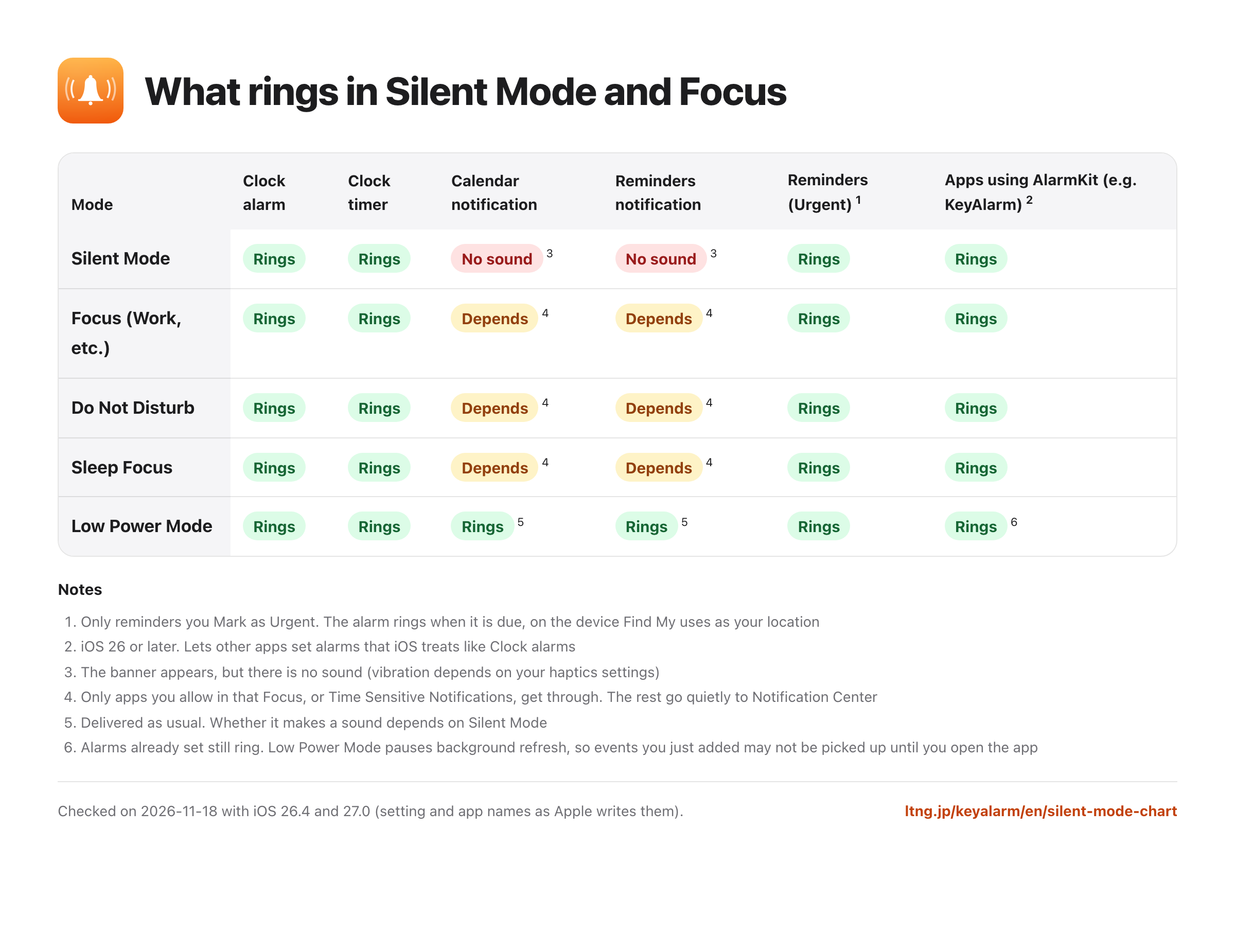
| Mode | Clock alarm | Clock timer | Calendar notification | Reminders notification | Reminders (Urgent)1 | Apps using AlarmKit (e.g. KeyAlarm)2 |
|---|---|---|---|---|---|---|
| Silent Mode | Rings | Rings | No sound3 | No sound3 | Rings | Rings |
| Focus (Work, etc.) | Rings | Rings | Depends4 | Depends4 | Rings | Rings |
| Do Not Disturb | Rings | Rings | Depends4 | Depends4 | Rings | Rings |
| Sleep Focus | Rings | Rings | Depends4 | Depends4 | Rings | Rings |
| Low Power Mode | Rings | Rings | Rings5 | Rings5 | Rings | Rings6 |
Notes
- Only reminders you Mark as Urgent. The alarm rings when it is due, on the device Find My uses as your location
- iOS 26 or later. Lets other apps set alarms that iOS treats like Clock alarms
- The banner appears, but there is no sound (vibration depends on your haptics settings)
- Only apps you allow in that Focus, or Time Sensitive Notifications, get through. The rest go quietly to Notification Center
- Delivered as usual. Whether it makes a sound depends on Silent Mode
- Alarms already set still ring. Low Power Mode pauses background refresh, so events you just added may not be picked up until you open the app
Checked on 2026-11-18 with iOS 26.4 and 27.0 (setting and app names as Apple writes them).
02Alarms vs. notifications
Clock alarms and timers are built to sound regardless of Silent Mode or Focus. Calendar and Reminders alerts are notifications: they make no sound on Silent, and during a Focus only the ones you allow get through.
Since iOS 26, AlarmKit lets other apps set alarms that iOS treats like Clock alarms. Urgent reminders use the same mechanism.
03When you can’t afford to miss an event
- For a one-off event, a Clock alarm set by hand is the surest option
- For to-dos, add them to Reminders and Mark as Urgent to get an alarm when they’re due
- Calendar notifications get through a Focus if you allow Calendar or turn on Time Sensitive Notifications, but they still make no sound on Silent
- To make the calendar events themselves ring, use an app that uses AlarmKit. KeyAlarm turns events with your keywords into alarms automatically (keyword recipes)
04How we checked
Names in the table match what iOS 26.4 and 27.0 show in Settings, Calendar and Reminders. That Urgent reminders become alarms on that device comes from the text in the Reminders app of iOS 26.4 and 27.0. Clock alarms, timers and notifications behave as Apple’s iPhone User Guide describes. We confirmed on a real iPhone in August 2026 that KeyAlarm rings with Silent Mode and a Focus both on.
Behavior can change with the iOS version and your settings (volume, haptics, what a Focus allows).
05Read next
06FAQ
How do I let only Calendar notifications through a Focus?
Go to Settings > Focus, pick your Focus and add Calendar to the allowed apps. Or go to Settings > Notifications > Calendar and turn on Time Sensitive Notifications. Either way, there’s still no sound on Silent.
Do alarms ring in Low Power Mode?
Yes. Clock alarms and alarms already set by AlarmKit apps ring. Low Power Mode pauses background refresh, so in KeyAlarm an event you just added may not be picked up until you open the app.
Which device rings for an Urgent reminder?
The device Find My uses as your location. The Reminders app says the alarm works there even when that device is on Silent or in a Focus.
Make calendar events ring like Clock alarms
KeyAlarm works on iPhone and iPad with iOS 26 or later. 30 days free, then a one-time purchase (no subscription).